How to Automate LinkedIn Video Outreach Without Risking the Account
automate linkedin video outreachrecruiting teams video messaging connectionscan you send a video message on linkedin
How to Automate LinkedIn Video Outreach Without Risking the Account
What to automate and what to keep manual when sending personalized LinkedIn video messages at scale, with 2026 benchmarks and a compliant team workflow.
How to Automate LinkedIn Video Outreach Without Risking the Account
Automated LinkedIn video outreach is the practice of using software to research prospects, script and render personalized videos, host them and track views, while a person still sends each message on LinkedIn. The pressure to try it is real: connection-request reply rates fell 37% in a year, from 3.5% to 2.2% (Expandi, 2026), while message reply rates held at 10-11%. Plain text notes are fading, and a rep who records every clip by hand cannot keep up. This guide shows how a Sales Development Representative (SDR) team can automate LinkedIn video outreach without risking the account: what to automate, what to keep manual, and which benchmarks to test against. For the wider method, see how to send personalized videos at scale.
Key Takeaways
Automating LinkedIn video outreach is safe only around the send: research, scripting, rendering, hosting and tracking can run automatically, while a person sends each message.
A native LinkedIn video message reportedly works only from the mobile app to 1st-degree connections, so desktop and cold sends use a hosted video link.
Campaigns run by 6-20 senders, a typical SDR team setup, had a median reply rate of 25% versus 22.22% for single senders (HeyReach, 2026).
No independent benchmark for LinkedIn video DMs exists, so teams should A/B test video against text on the same segment.
By Carlos Agüero, who works on multi-channel outreach automation, inbox deliverability and AI-powered video at TargetGrid.ai, Skale.email and Potion.
Can you automate LinkedIn video outreach without risking the rep's account?
You can automate the preparation around a LinkedIn video message, but not the send itself, without taking on serious account risk. LinkedIn's policy on prohibited software, as quoted by contentin.io, warns that users "risk having their accounts restricted or shut down" (contentin.io, 2026). Safe automation covers research, scripting, rendering, hosting and tracking, while a human taps send.
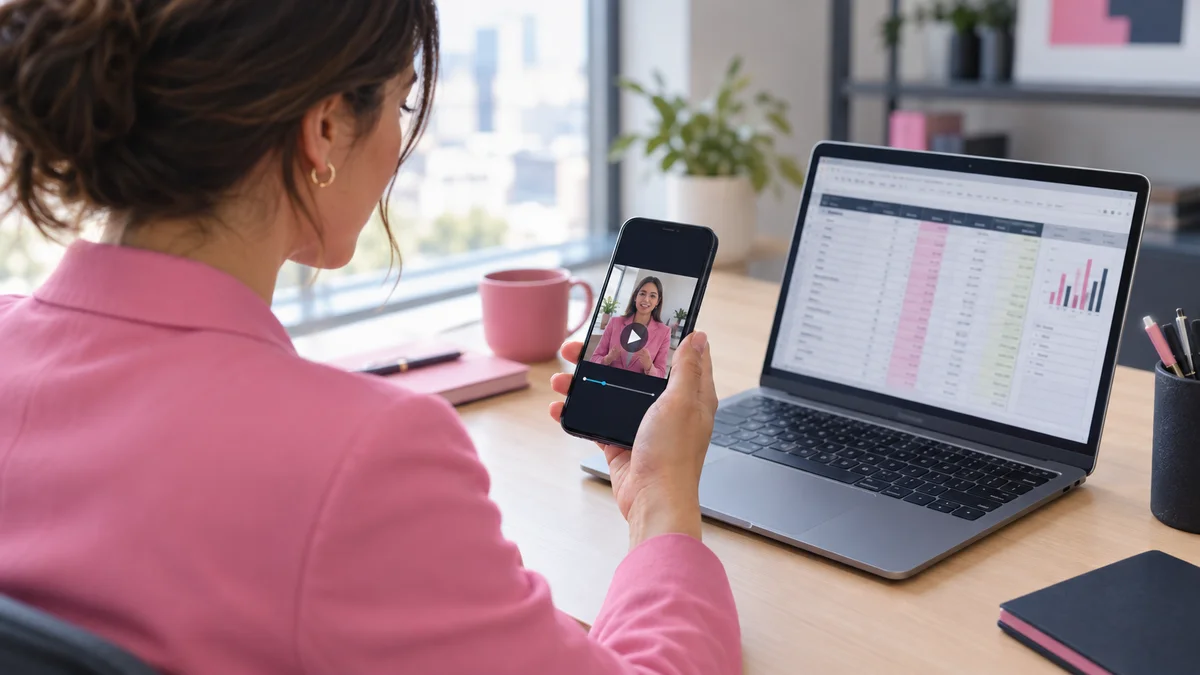
Sales rep reviewing a recorded video on a phone before manually sending it
Video prospecting is sending short, personalized video to a prospect in place of, or alongside, text outreach. On LinkedIn, the risk sits in the sending behavior, not in the video. The table shows where each task falls.
Task
Automate?
Why
Prospect research and list building
Yes
Happens outside LinkedIn, no account exposure
Script variants by trigger
Yes
Text work, no platform interaction
Video rendering (personalized intro, thumbnail)
Yes
Happens on your video platform
Link hosting, view tracking, Customer Relationship Management (CRM) logging
Yes
Lives on your own landing page and CRM
Connection requests and message sends
No
Third-party sending tools are the exposure
Final review and send
Human
Keeps the account's behavior natural
What has LinkedIn done about automation?
Enforcement appears to target vendors. HeyReach says LinkedIn removed its company page and restricted its executives' profiles on March 25, 2026, an account relayed by Overloop (Overloop, 2026). Treat it as a vendor-reported incident, not an official announcement. Ban-rate figures circulating online are secondhand and unverified, so treat any precise number with suspicion. A plan that relies on being undetectable is a weak plan. A plan that keeps the human send is not.
Can you send a video message on LinkedIn, and how do you do it?
Yes, you can send a video message on LinkedIn: open a chat with a 1st-degree connection in the mobile app, tap the video option, record, review and send. A native LinkedIn video message is a clip recorded inside a LinkedIn chat. From desktop, or to people outside your network, paste a hosted video link; 71% of video marketers rate 30 seconds to 2 minutes most effective (Wyzowl, via frameos.studio, 2026).
Hand holding a smartphone recording a short selfie video message in a cafe
That Wyzowl figure comes from a small, self-reported survey of 266 respondents, so treat it as opinion, not measured performance.
Send a native video message
Open the LinkedIn mobile app and go to Messaging.
Open the chat with a 1st-degree connection.
Tap the video or camera option in the message bar (the label can differ by app version).
Record your clip, play it back and re-record if the opening is weak.
Send only after you have checked the name, the role and the one ask.
To verify it worked, confirm the clip shows in the thread as sent and plays back. Length caps are reported as 60 seconds, 2 minutes or 3 minutes in different guides, and many are one to five years old. Test the limit in your own app.
Send a hosted video link
A hosted video link is a URL to a video stored on a landing page or video platform, pasted into a message as plain text. It works from desktop and mobile.
Record a base video once.
Host it on a page with a personalized thumbnail and intro.
Paste the link under one personalized first line.
Log the send and track views in your CRM.
Method
Where it works
Main limit
Native video message
Mobile app, 1st-degree connections (verify in current app)
Manual, one at a time
Hosted video link
Desktop and mobile, any message
Recipient must click through
Generate AI videos in your own face, voice, and gestures at scale. Start Free Trial
How do you build a compliant LinkedIn video workflow for a sales team?
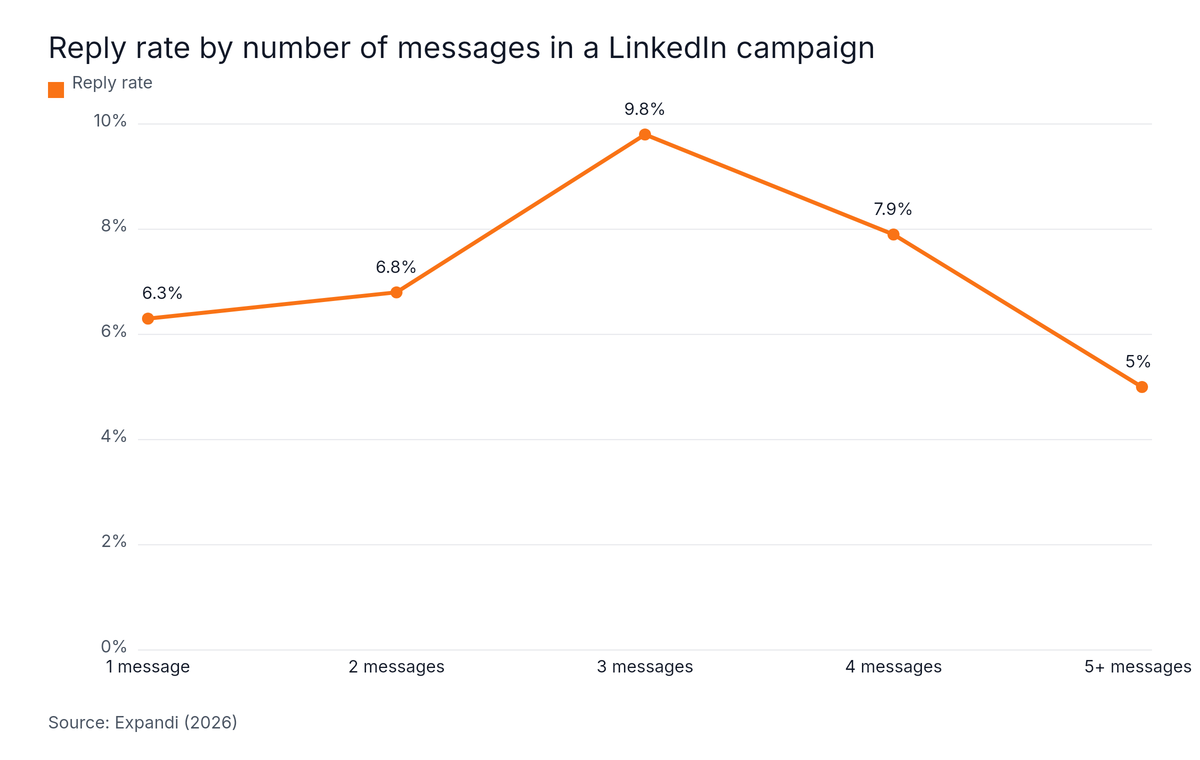
A compliant LinkedIn video workflow for a Sales Development Representative (SDR) team uses human-recorded base videos, a personalized intro and thumbnail per prospect, and a manual send. Expandi's data shows three-message sequences reply best at 9.8%, against 5.0% for sequences of five or more (Expandi, 2026), so the video fits in message two.
Small sales team around a table planning a video outreach sequence on sticky notes
Set the sequence and the sender pool
Message one is a short text note after the connection is accepted. Message two carries the video. Message three is a brief follow-up for non-viewers. Cap the sequence at three.
Line chart: Reply rate by number of messages in a LinkedIn campaign. Highest: 3 messages at 9.8%.
The chart shows reply rate peaking at 9.8% for three messages and dropping to 5.0% at five or more, based on 2,966 campaigns (Expandi, 2026). Sender pool size matters too. HeyReach's data shows campaigns run by 6-20 senders had a median reply rate of 25%, versus 22.22% for single-sender campaigns, and very large pools (50+) declined (HeyReach, 2026).
Split the work across the team
Stage
Owner
Automated?
Metric
Record base video
Rep
No
Review score
Render personalized intro and thumbnail
Video platform
Yes
Render errors
QA of names, roles and company data
SDR manager
Spot check
Error rate
Send message
Rep
No
Sends per week
Track views and log to CRM
CRM
Yes
View-to-reply rate
Follow up with non-viewers
Rep
Template
Meeting booked
Keep a real face in the first touch and make only the personalization layer synthetic. Gartner's survey of 645 buyers, published in May 2026, found 69% prefer to validate AI-generated insights with sales reps (Gartner, via BizTech Reports, 2026). Robert Blaisdell of Gartner adds: "Sales leaders should not interpret buyer preference for digital self-service as a signal that sellers matter less" (Gartner, 2026).
Our data: Potion's case studies show GrowPronto booked 45 meetings and closed 7 accounts with Potion, and SAP closed USD500K+ with Potion's AI-generated videos (Potion case studies, 2026). These are outcomes from personalized video outreach in general, not LinkedIn-specific results, so use them as context rather than a LinkedIn benchmark.
What reply rates should LinkedIn video messages beat?
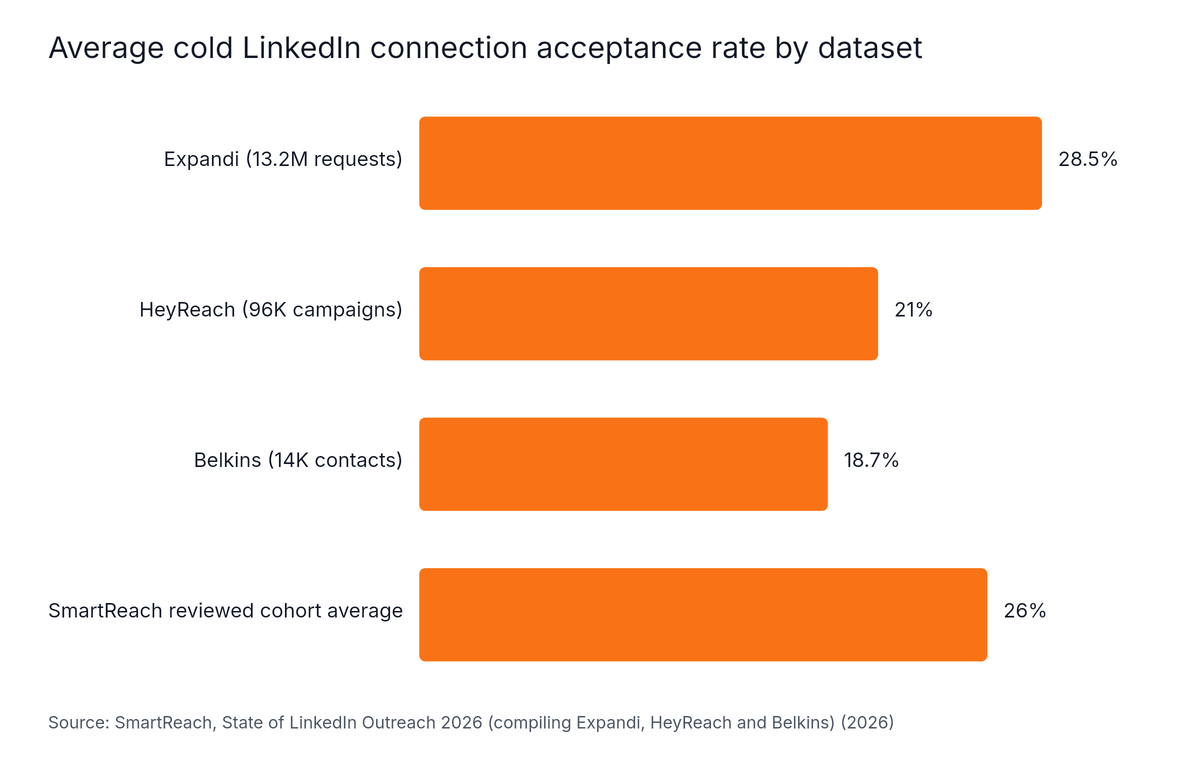
LinkedIn video messages must beat a text baseline that differs by dataset: connection acceptance is 28.5% in Expandi's data (Expandi, 2026), 21% in HeyReach's (SmartReach, 2026) and 18.7% in Belkins' (Belkins, 2026). No independent benchmark for video DMs exists, so run your own A/B test.
Manager marking benchmark numbers on a paper notepad next to a phone
The three datasets disagree, which is why your own baseline matters most. Expandi's researchers say it directly: "a dropping acceptance rate is usually a sender-side variable, not a platform shift." (Expandi, 2026)
Horizontal Bar chart: Average cold LinkedIn connection acceptance rate by dataset. Highest: Expandi (13.2M requests) at 28.5%.
All three figures come from vendor or agency data, and Expandi's skews toward automated senders, so no single number is a target.
Where video sits in the funnel
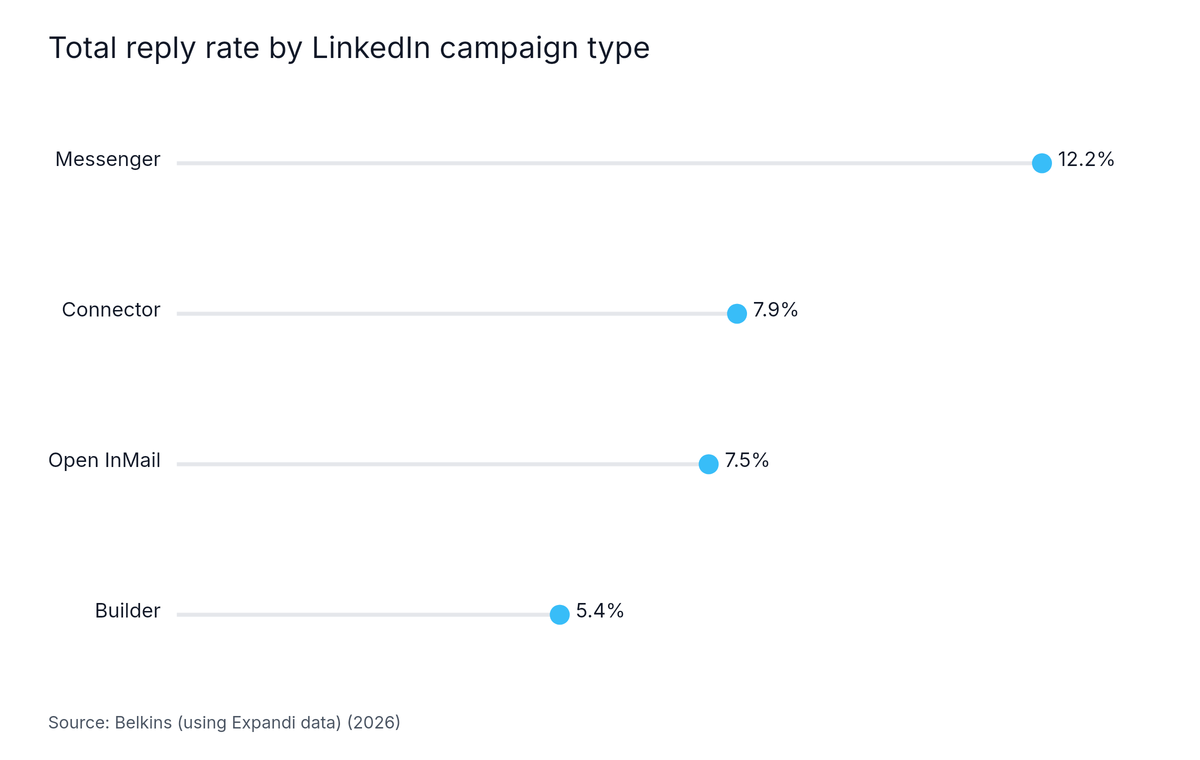
A messenger-style campaign is a LinkedIn campaign that sends messages to existing 1st-degree connections. These had the highest total reply rate Belkins benchmarked, at 12.2%, ahead of Connector campaigns at 7.9% and Open InMail at 7.5% (Belkins, 2026).
Lollipop chart: Total reply rate by LinkedIn campaign type. Highest: Messenger at 12.2%.
The 1.3% meeting rate in Belkins' own campaigns (Belkins, 2026) is a reality check for any video funnel. Test video against text on the same segment and compare replies, watch-through and meetings booked.
How do recruiting teams use video messages to turn LinkedIn connections into conversations?
Recruiting teams send a short personal video after a candidate accepts a connection, because Staffing & Recruiting already leads message reply rates at 18.9%, roughly double Computer Software's 8.8% (Expandi, 2026). Most reserve video for shortlisted candidates, since a recruiter has to record it. A clip naming the role and one question keeps the thread moving.
Recruiter recording a friendly video message for a candidate at a standing desk
A simple recruiter pattern
Connect with a short note.
After acceptance, send a 1:1 clip that names the role, the team and one reason the candidate fits.
End with one question that is easy to answer.
Keep the accompanying text short.
On text length, LinkedIn data shows InMails under 400 characters get a 22% higher response rate than average (Noon, 2026). LinkedIn's Recruiter policy says users "must maintain an InMail response rate of at least 13% on 100 or more InMail messages sent within every 14-day assessment period" (Noon, 2026). Low-quality sends put that floor at risk.
Who should not automate LinkedIn video outreach?
Teams that need guaranteed high-volume LinkedIn sends should not expect video automation to deliver them safely, because LinkedIn polices third-party automation at the vendor level. Only 1.3% of connected prospects booked a meeting in Belkins' own campaigns (Belkins, 2026), so treat every benchmark here as a baseline, not a promise.
Teams wanting a hands-off send: the compliant LinkedIn video workflow keeps a person on every message.
Teams without a baseline: without your own text results, you cannot tell whether video helped.
Teams planning heavy recruiter volume: video does not scale across a full pipeline, so reserve it for shortlisted candidates.
Anyone relying on the numbers as forecasts: most benchmarks here come from vendor platform data, which skews toward automated senders.
Teams counting on official integrations: the Sales Navigator API is closed to new partners as of August 2026 (Leadium, 2026), which narrows compliant integration paths.
Frequently Asked Questions
How do I send a video message on LinkedIn?
You send a video message on LinkedIn by opening a chat with a 1st-degree connection in the mobile app, tapping the video option, then recording, reviewing and sending. Availability reportedly differs on desktop, so paste a hosted video link there instead. Menu labels and length limits change, so check LinkedIn's Help Center for current rules.
Is it against LinkedIn's rules to automate video messages?
Automating the send of LinkedIn video messages with third-party software is against LinkedIn's rules: its prohibited-software policy warns that users "risk having their accounts restricted or shut down" (contentin.io, 2026). Automating the work around the send, such as research, scripting, rendering, hosting and tracking, avoids that exposure while a human sends each message.
Can I send a hosted video link in a LinkedIn message?
Yes, you can send a hosted video link in a LinkedIn message from desktop or mobile, and the recipient sees a normal link. Because the video does not play inline, a short personalized first line and a clear thumbnail on the landing page do most of the work of earning the click.
How long can a LinkedIn video message be?
Published guides disagree on the cap for a native LinkedIn video message, quoting 60 seconds, 2 minutes or 3 minutes, and many are one to five years old. Check the current limit in the LinkedIn app before recording, and keep the clip short enough that a busy recipient watches it to the end.
How do recruiting teams use video messages to turn LinkedIn connections into conversations?
Recruiting teams use LinkedIn video messages as a targeted second message after a candidate accepts a connection, naming the role and asking one simple question. Staffing & Recruiting leads message reply rates at 18.9% in Expandi's August 2026 data (Expandi, 2026), so reserve video for shortlisted candidates rather than a mass send.
What should your team do next?
Automated LinkedIn video outreach works best when software prepares the message and a person sends it, with the video placed in message two of a three-message sequence. Expandi's data shows three-message sequences reply best at 9.8%, against 5.0% for five or more (Expandi, 2026), so cap the sequence there and keep the send manual.
Automate research, scripting, rendering, hosting and tracking, never the send.
Use the mobile app for native clips and a hosted link everywhere else.
Benchmark against your own text baseline, since the public datasets disagree.
Keep a real human face in the first touch.
Start with one segment, one base video and one A/B test against text. For sequence ideas, read the video prospecting playbook. To build the videos, Start Free Trial with SendPotion.
Written by
Carlos Agüero
Carlos Agüero builds tools that help B2B sales teams sell smarter. As part of TargetGrid.ai, Skale.email, and Potion, he's focused on multi-channel outreach automation, inbox deliverability, and AI-powered video. Berkeley Haas COBE. Based in Santiago, Chile. Passionate about helping sales teams close more, faster, with less manual work.

 Carlos AgüeroNov 13, 2026