video prospecting tools email crm integrationvideo cta tools personalized viewer databest personalized video engine for crm campaigns
Video Prospecting Tools With Email and CRM Integration for HubSpot and Salesforce
Which video prospecting tools push views and clicks back to HubSpot and Salesforce? Compare documented write-back paths and what to test before you buy.
Video Prospecting Tools With Email and CRM Integration for HubSpot and Salesforce
Video prospecting tools with email and CRM integration generate personalized videos, send them through your sequences, and log views and clicks on HubSpot or Salesforce records, though how much data returns varies by tool and plan.
Reps already feel the squeeze: 48% say they lack the bandwidth for adequate cold outreach, even while spending nearly a full day each week prospecting (Salesforce, 2026). Video helps only if the results come back to the Customer Relationship Management (CRM) system where managers work. This guide names tools and what they document, explains what write-back should include, shows how to trigger video from a deal stage, and lists what to check before you buy. For the production side, see how to send personalized videos at scale.
Key Takeaways
Video prospecting tools differ in CRM write-back depth: BombBomb documents CRM tracking return as a separate optional connector, so test every vendor on a real record.
A HubSpot deal-stage trigger can start a video through a native action, a webhook or Zapier, and HubSpot ties lead pipeline automation to Sales Hub Professional and Enterprise.
Calendar links and CTA buttons under a video only pay off if the booking is attributed back to the right contact and deal.
Judge any video campaign against an independent cold-email baseline and your own control group, not a vendor's headline multiplier.
Which video prospecting tools push views and clicks back into Salesforce or HubSpot?
Video prospecting tools that push views and clicks back into Salesforce or HubSpot include Potion, which lists native HubSpot and Salesforce workflows, and BombBomb, whose 2025 HubSpot integration sends videos through HubSpot workflows but keeps engagement data in BombBomb unless an optional CRM connector is added. Depth differs by tool and plan, so test each.
Sales manager reviewing a CRM contact timeline that lists video views and link clicks
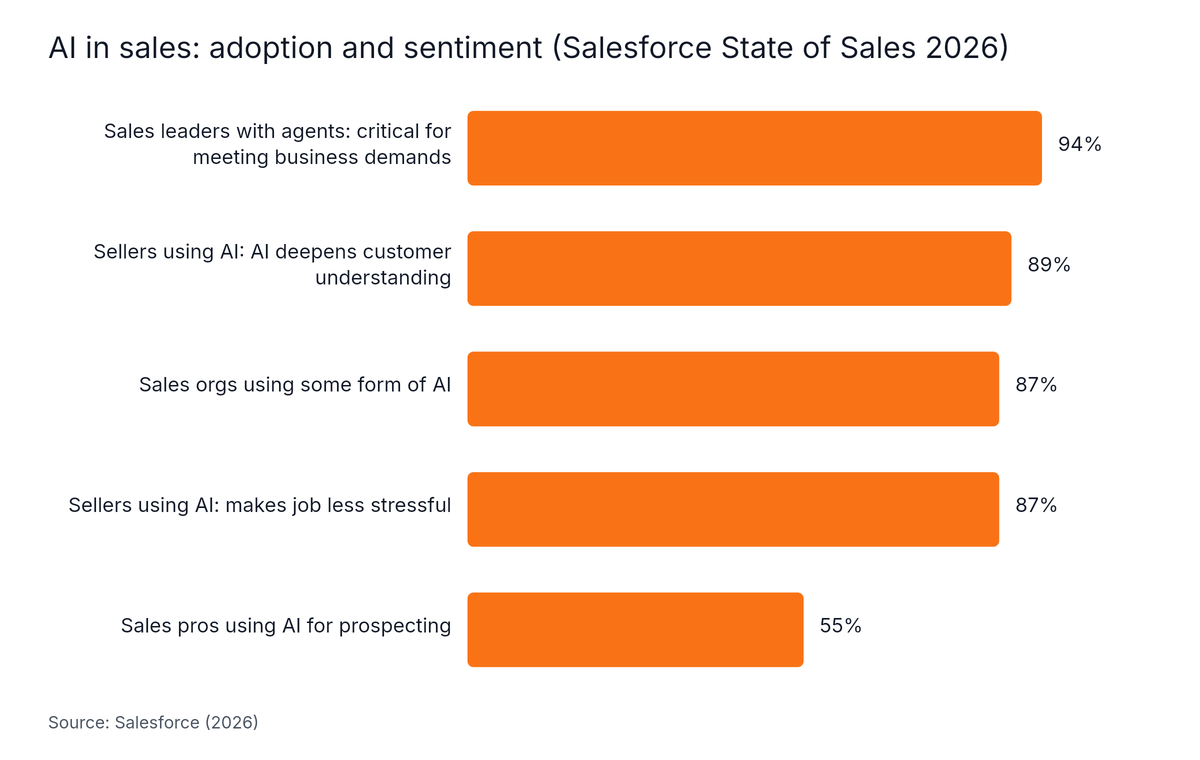
Video prospecting is the use of short personalized videos in cold outreach, sent by email, LinkedIn or SMS, to earn replies and meetings. The category is mainstream. Salesforce's State of Sales 2026 survey of 4,050 sales professionals found 87% of sales organizations currently use some form of AI for tasks like prospecting, and 55% of sales professionals use AI for prospecting (Salesforce, 2026).
HubSpot's editorial summary of its 2026 data puts the shift this way: "AI in sales has moved past the optional stage, but access is not the problem for most teams" (HubSpot Blog, 2026). The open question is whether a tool fits your stack and reports back.
Horizontal Bar chart: AI in sales: adoption and sentiment (Salesforce State of Sales 2026). Highest: Sales leaders with agents: critical for meeting business demands at 94%.
The table below uses only what each vendor publishes. Potion's row is the company's own product specification, and BombBomb's row comes from its 2.2 release notes (2025).
Tool
Documented CRM path
What is documented about engagement data
What to verify in a pilot
Potion
Native workflows with HubSpot, Salesforce, Outreach, Salesloft and Apollo; CRM triggers for automated sends; CSV upload
Branded video pages with calendar embeds and CTA buttons
Which events (view, watch time, CTA click, booking) land on the CRM record
BombBomb
HubSpot integration in release 2.2, so videos send through HubSpot campaigns and workflows
Engagement data stays in BombBomb; CRM tracking return is a separate optional connector
Whether the connector is included in your plan and what it writes
CRM write-back is the return of video engagement data, such as sends, views, watch time, call-to-action clicks and bookings, to the contact, deal or activity records in HubSpot or Salesforce. HubSpot's 2026 State of Sales Report found 72% of leaders say their tools can't access complete, accurate revenue data (HubSpot, 2026), which is the gap write-back should close.
Many tools say they "integrate" without saying what lands where. Use this checklist when you ask for a demo:
Engagement event
Where it should appear
Question to ask the vendor
Video sent
Contact timeline (HubSpot) or activity record (Salesforce)
Is the send logged by the tool or by your sequencer?
Video viewed, % watched
Timeline entry or custom property
Is watch time stored as a field you can report on?
CTA button clicked
Timeline entry or task
Can a click trigger a workflow or alert the owner?
Meeting booked
Meeting record linked to the contact and deal
Is the booking attributed to the deal, not just the contact?
Reply
Email thread or activity
Does the reply stop further video sends?
A video tool that keeps numbers only in its own dashboard creates a second set of records to reconcile. Ask for a test record in your own CRM before you sign anything. For context on first-touch use, see what video outreach is and whether it works in cold email.
Can viewers book on the spot from a CTA under the video?
Yes, a video page can show a call-to-action button or calendar link beside the player, but support differs by vendor and plan. Test three things in a pilot: the button works on the landing page, a booked test meeting attaches to the right contact and deal, and email clients that block playback still show a clickable thumbnail.
Native integration, webhook or Zapier: which path fits triggered video?
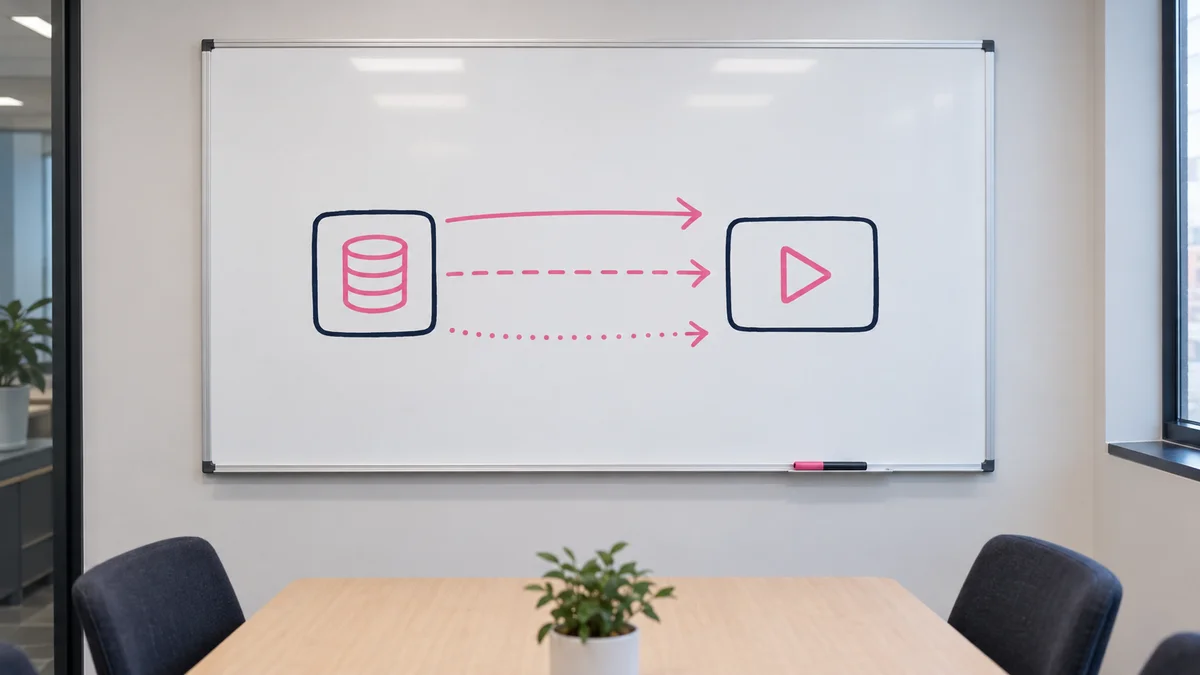
A webhook is an automatic message one app sends to another when an event happens. HubSpot's workflow guide says "In workflows, a webhook connects HubSpot events to other apps in real time" (HubSpot, 2026). Native integrations run inside your CRM, webhooks add control for developers, and middleware such as Zapier suits teams without engineering help.
Whiteboard diagram comparing native integration, webhook and middleware paths between a CRM and a video tool
Middleware is software that connects two apps and passes data between them without custom code. The right path depends on who owns the build and how much control you need. Adoption matters as much as capability: 26% of sales leaders surveyed by HubSpot in 2026 named difficulty adopting new tools as their top operational challenge (HubSpot, 2026). Paths that run inside the CRM your reps already use tend to meet less resistance.
Path
How it works
Best when
Watch out for
Native workflow
The video tool appears as an action or app inside HubSpot or Salesforce
Sales ops wants low maintenance
Confirm which engagement events return to the CRM
Webhook
The CRM sends a stage change to the video tool's endpoint
You have a developer and need custom field mapping
Error handling and retries are yours to build
Middleware (Zapier and similar)
A connector watches the CRM and calls the video tool
No engineering help is available
Polling delays and per-task cost
CSV upload
You export a list and upload it for bulk generation
One-off campaigns and list tests
No live link to deal stage changes
Mix paths if needed: use a CSV upload for a closed-lost reactivation test, then move the winning play to a CRM trigger.
How do you trigger a video when a deal changes stage in HubSpot or Salesforce?
A deal-stage trigger starts an automation when a deal moves to a new pipeline stage. In HubSpot, you build it as a workflow that passes the contact to your video tool through a native action, a webhook or Zapier. HubSpot's knowledge base describes lead pipeline automation as a Sales Hub Professional and Enterprise feature.
Sales operations specialist building a deal stage workflow on a monitor
Confirm your tier with HubSpot before you plan around it. Clean data matters too. HubSpot's 2026 report found 65% of salespeople lose at least a business day a month reconciling data across systems (HubSpot, 2026), so map fields carefully before you automate. Here is a simple build order:
Record the master video once. Use a template with a clear hook and one call to action.
Prepare the CRM fields. Map first name, company and website URL so each video can be personalized.
Create the workflow. Set enrollment to a specific deal stage, such as "Proposal sent."
Add the video action. Use the native action, a webhook step or a Zapier zap to send the contact to the video tool.
Set guardrails. Each enrolled contact means one render, so cap enrollment, exclude contacts already in a sequence and test with five records first.
Check the write-back. Confirm the view and click events appear on the contact and deal timelines before you scale.
What about Salesforce opportunity stages?
Salesforce Flow is Salesforce's built-in automation builder, and an admin can start a flow when an opportunity stage changes. The real question is whether the video vendor can receive that call and then write engagement back as activity records, tasks or custom fields on the contact or opportunity. Many guides cover HubSpot and give Salesforce one line, so ask for specifics. Run this vendor-demo test in a sandbox:
Change a test opportunity to the target stage.
Confirm the video is generated for that contact only.
Check that the send, view and click events appear on the Salesforce record.
Confirm a second stage change does not render a duplicate video.
Keep a human review step for high-value accounts. For sequence design, the video prospecting playbook shows where video fits.
How should you measure video prospecting results against a baseline?
Measure video prospecting results against an independent cold-email baseline before you judge any vendor claim. Belkins measured a 0.50% reply rate in the first half of 2025 and 0.40% in the second half, a 20% decline, across more than 7.5 million cold emails (Belkins, 2026).
Printed reply-rate report and notebook on a desk, ready for a baseline comparison
Company size changes the baseline too. Run your own control group against the numbers below, because vendor-claimed reply rates often use different denominators.
If you sell to enterprises, expect a harder baseline: Belkins' 2025 campaign data puts companies with 10,000+ employees at a 0.22% reply rate (Belkins, 2026). Judge video against that, not against a headline multiplier.
Our results: GrowPronto: 45 meetings booked, 7 accounts closed. SAP closes USD500K+ with Potion's AI-generated videos.
The GrowPronto case shows that a video-led outbound program can end in booked meetings and closed accounts. It does not show CRM write-back depth or a reply-rate lift, and these are Potion customer outcomes, not independent research. To compare tools on features, see our guide to video messaging software.
Who is personalized video with CRM triggers not for?
Triggered personalized video is not for teams that cannot confirm which engagement events a vendor writes to their CRM, that lack consent and disclosure rules for AI-cloned faces and voices, or that have no admin access to build workflows. Test any vendor on a sandbox record first, and clone only your own face and voice.
Honest limits to weigh before you buy:
Write-back is not guaranteed. Verify event-level logging on a test record during your pilot, whichever vendor you pick.
Plan requirements apply. HubSpot's deal-stage automation depends on your Sales Hub tier.
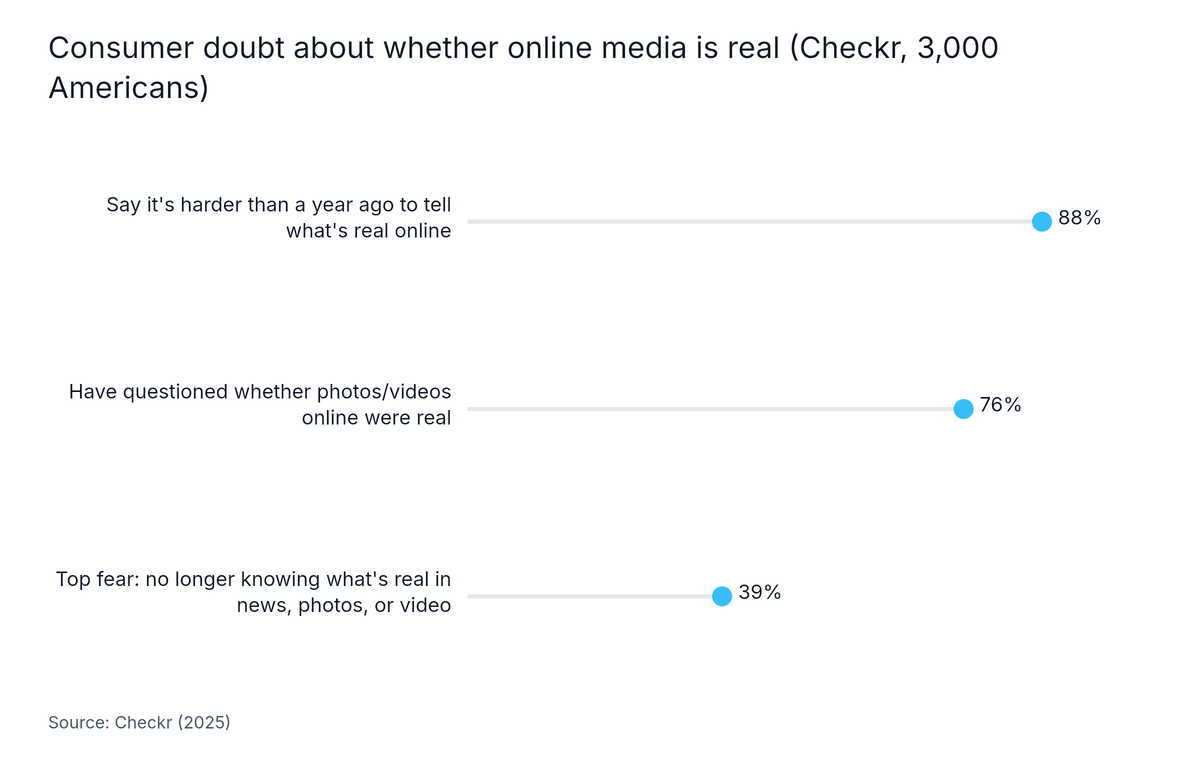
Trust is a live issue. Checkr's 2025 survey of 3,000 Americans found 88% say it's harder now than a year ago to tell what's real online, and 76% have questioned whether photos or videos they saw were real (Checkr, 2025). It is a consumer survey, so treat it as directional for B2B buyers.
Deepfake context. Deloitte's 2025 survey of 3,524 U.S. consumers found 58% met at least one scam attempt in the past year, including deepfake videos and voice cloning (Deloitte, 2025). That is background for why cloned-rep video carries a trust risk, not a measure of your buyers.
Cloning needs consent. Disclose AI use in your outreach policy.
Security paperwork. Potion holds SOC 2 Type I from an independent audit, and its public Data Processing Agreement (DPA) and Privacy Policy are available for compliance review.
Lollipop chart: Consumer doubt about whether online media is real (Checkr, 3,000 Americans). Highest: Say it's harder than a year ago to tell what's real online at 88%.
Can I put a calendar link and CTA button right under the video so viewers book on the spot?
Video tools can usually place a call-to-action button or calendar link beneath the player, but support varies by vendor and plan, so confirm it in a pilot. Book a test meeting from a sample video and check that the booking attaches to the right contact and deal, because a link that carries no contact identity can leave the meeting unattributed.
We want a video generated whenever a deal changes stage in HubSpot. Which tools do that?
Any video tool that accepts a webhook call, a native workflow action or a middleware step can generate a video when a HubSpot deal changes stage. HubSpot describes lead pipeline automation as a Sales Hub Professional and Enterprise feature, so confirm your tier, then ask each vendor to demonstrate the trigger on a test deal.
Does a video tool log views, watch time and CTA clicks in HubSpot and Salesforce, or only in its own dashboard?
Video prospecting tools differ in whether they log views, watch time and CTA clicks on HubSpot and Salesforce records or only in their own dashboard. BombBomb's 2025 release notes, for example, describe CRM tracking return as a separate optional connector. Ask any vendor to show each event on a test record in your own CRM.
Conclusion: how to choose a video prospecting tool for your CRM
Choose the tool that proves its write-back, not the one with the longest integration list. Start with five checks:
Ask for views, watch time and CTA clicks to appear on a test contact or deal timeline.
Match the integration path (native, webhook, middleware or CSV) to who owns the build.
Confirm your HubSpot tier supports deal-stage workflows.
Cap enrollment so a workflow cannot render thousands of videos by accident.
Measure against your own control group, not a vendor's headline multiplier.
Review video prospecting examples before you script your first template, then test CRM triggers on a small segment. Start Free Trial to check Potion's write-back on your own records.
Written by Carlos Agüero, who builds multi-channel outreach, deliverability and AI video tools for B2B sales teams at TargetGrid.ai, Skale.email and Potion. Berkeley Haas COBE, based in Santiago, Chile.
Written by
Carlos Agüero
Carlos Agüero builds tools that help B2B sales teams sell smarter. As part of TargetGrid.ai, Skale.email, and Potion, he's focused on multi-channel outreach automation, inbox deliverability, and AI-powered video. Berkeley Haas COBE. Based in Santiago, Chile. Passionate about helping sales teams close more, faster, with less manual work.

 Carlos AgüeroOct 30, 2026